Quick Summary
- Email marketing automation works best as one layer inside a connected revenue system.
- Start with one workflow, but connect it to real behaviour, CRM data, pipeline stages, clear ownership and closed-loop reporting.
- Automation should act as a pilot, not an autopilot: it executes repeatable work under human judgement.
Start by automating one part of your email programme, not all of it.
That is good advice.
A smaller first workflow is easier to test, easier to diagnose and easier to improve before you scale it.
Here’s the problem:
Most teams do not struggle because they automated too much. They struggle because they automated in isolation.
A sequence gets built, switched on and left running.
Nothing intelligent decides who enters it. Nothing meaningful happens when someone engages. Nobody owns the handoff.
And the reporting stops at opens and clicks, long before pipeline or revenue enters the picture.
The automation is working exactly as configured.
The system around it is not.
That is the distinction this guide will keep returning to.
You will get every email marketing automation best practice that matters: segmentation, triggers, personalisation, nurture, testing, deliverability, compliance, mobile design and measurement.
But you will also get the part most checklists leave out: how to connect those practices so your automation does more than send.
It compounds.
What Is Email Marketing Automation, Really?
Email marketing automation is software that sends behaviour-triggered messages as part of a connected revenue system. It is wired to your CRM, pipeline stages, lead signals, ownership rules and reporting so each message responds to what a prospect does and contributes to a measurable commercial outcome.
The root error is treating automation as a standalone email channel.
When that happens, the workflow may send on time, personalise a subject line and record opens. Yet it still has no connection to qualification, sales follow-up or closed-loop reporting.
A useful automation should know why someone entered and what stage they are in.
It should also know what action should happen next, who owns that action and how the result will be measured.
Without those connections, automation only reduces manual sending.
With them, it becomes an execution layer inside a connected revenue system. It helps move qualified opportunities forward instead of simply adding more emails to the inbox.
Why Most Email Automation Quietly Underperforms
The automation platform was purchased. The workflows were built. Emails are going out.
But the expected value never arrived.
You are not alone in that. Gartner’s 2025 Marketing Technology Survey found that only 49% of martech tools are actively used.
Just 15% of organisations qualify as high performers that meet their strategic goals and can show positive ROI from their stack.
The tools exist. The system around them does not.
Here’s where most teams go wrong:
A sequence is scheduled to run every Tuesday rather than triggered by what a prospect actually does.
Someone downloads a high-intent resource, but the CRM does not update their pipeline stage.
A lead crosses a qualification threshold, yet no salesperson is notified and nobody owns the next step.
Then performance is reported through open rates and clicks: numbers the board can see, but cannot connect to a qualified opportunity or closed deal.
The activity is visible. The commercial outcome is not.
| Dimension | Batch-and-Blast | Connected Automation |
|---|---|---|
| Sending logic | Fires on a calendar. Same message, same day, everyone. | Fires on behaviour and pipeline stage. |
| Relevance | Generic. Personalised to a first name at best. | Stage-aware. Matched to where the account actually is. |
| Measurability | Opens and clicks. Nothing downstream. | Closed-loop, from first touch to closed deal. |
| Pipeline impact | Unknown. Usually assumed. | Attributable to qualified opportunities. |
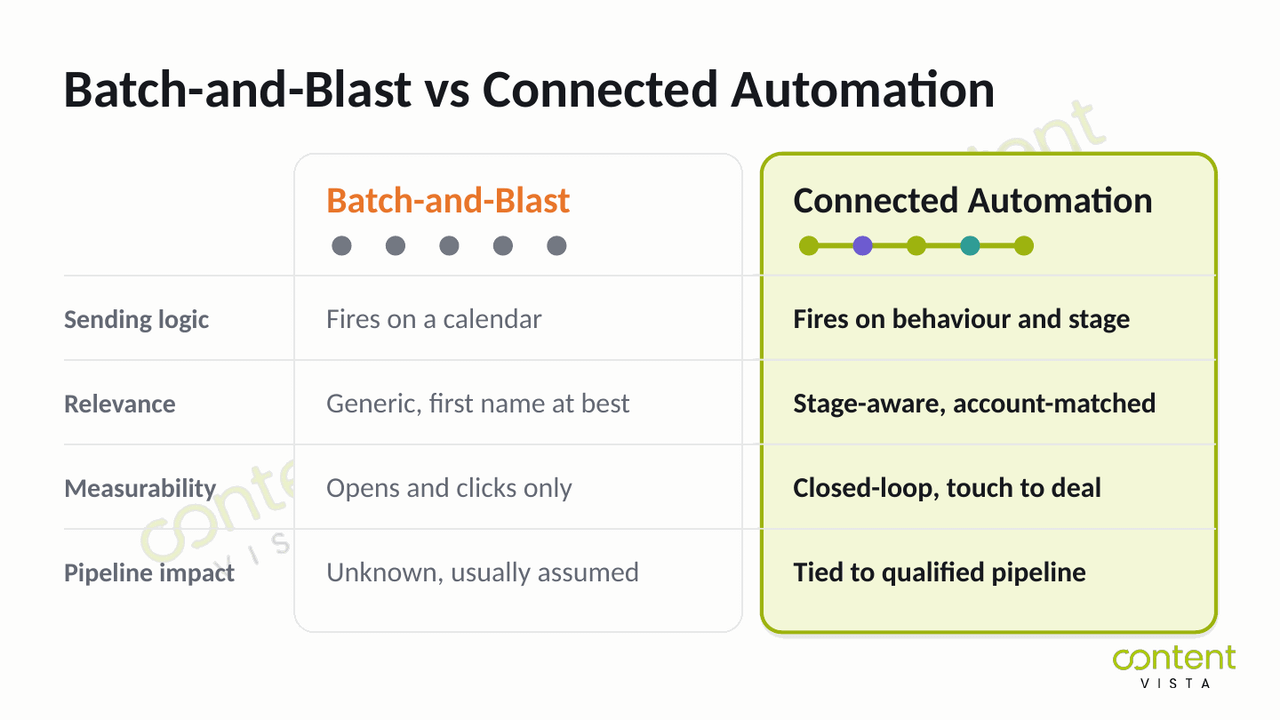
That difference is not created by better subject lines or another platform feature.
It comes from the conversion infrastructure surrounding the automation: behavioural signals, CRM data, pipeline stages, ownership rules, routing and closed-loop reporting.
Without those connections, automation simply sends faster. It cannot reliably qualify, route, nurture or prove its contribution to the pipeline.
So you do not have an email problem.
You have a connection problem.
And that makes quiet underperformance a system problem, not an activity problem.
Email Marketing Automation Best Practices (Done Properly)
Start with one automation, not ten
The standard advice is right: begin with one automation and prove it before building the next.
The reason is not simply to avoid complexity. It is to preserve diagnosis.
When five workflows launch at once, you cannot tell which trigger is wrong or which audience is poorly defined.
You also cannot tell which handoff is failing, or which sequence is actually creating qualified opportunities.
Start with one high-value workflow, such as a welcome sequence, a sales-ready alert or a dormant-lead re-engagement.
Define its trigger, owner, next action and measured outcome before you switch it on.
You cannot improve what you cannot isolate.
Segment by pipeline stage and account fit, not just demographics
Most segmentation stops at job title, industry, company size or geography.
Those fields help, but they do not tell you what the account needs next.
A better segment combines two things: where the account sits in the pipeline and how closely it fits your ideal customer profile.
A high-fit account researching implementation needs different communication from a low-fit contact who downloaded a broad guide.
Create segments such as “high-fit, early research,” “high-fit, sales-ready” and “engaged, not yet qualified.” Then align the message and next action to each segment.
This is where marketing systems and funnel design becomes more important than simply adding more lists.
Personalise beyond the first name
A first-name token is formatting. It is not meaningful personalisation.
Real personalisation comes from relevance: what the person engaged with, what problem they appear to be solving, what stage they have reached and what type of account they represent.
Instead of sending everyone the same nurture email with a different greeting, change the content itself.
A contact who viewed a pricing or service page may need decision support. Someone reading an introductory guide may need context, not a sales request.
A stakeholder from finance may need commercial justification, while an operator may need implementation detail.
Personalise the decision context, not just the salutation.
Trigger on behaviour, not on the calendar
A calendar tells you when your team wants to send. Behaviour tells you when the prospect has given you a reason to respond.
Use triggers tied to meaningful actions: submitting a form, visiting a high-intent page, attending a webinar, reaching a lead-score threshold, becoming inactive or moving into a new pipeline stage.
Let’s make this practical:
Audit every scheduled sequence and ask whether timing alone justifies the send.
If the answer is no, identify the behaviour or lifecycle event that should replace the date-based trigger.
A message sent because something changed is usually more relevant than one sent because it is Tuesday.
Build a welcome sequence that qualifies, not just greets
A welcome sequence should do more than confirm a subscription and introduce your brand.
It should begin collecting qualification signals.
Use the sequence to learn what the contact is interested in, what problem they are trying to solve and whether their behaviour suggests genuine commercial intent.
That might mean offering two clearly different content paths, watching which resource they choose or asking one low-friction question that helps route them correctly.
By the end of the sequence, your system should know more than it did at entry.
If the only outcome is “three emails delivered,” the sequence has greeted the contact but has not helped the pipeline.
Design nurture around a buying committee, not a buyer
B2B nurture often assumes one person moves neatly from awareness to decision. Real purchases rarely behave that way.
Different stakeholders enter at different times, ask different questions and influence the decision in different ways. Your nurture should support that reality.
Build content paths around roles and concerns: strategic value for leadership, implementation detail for operators, risk and integration for technical stakeholders, and commercial justification for finance.
Also make it easy for one contact to share relevant material internally.
The goal is not to push one person through a linear drip. It is to help an account build enough internal confidence to move forward.
For worked examples of how these sequences look in practice, see our lead nurturing sequence examples.
Test what changes decisions, not just what changes opens
Subject-line tests are useful, but they rarely tell you whether the automation improves the pipeline.
Test the parts of the workflow that affect movement: when the sequence starts, which behaviour changes the path and how long you wait between messages.
Also test what content appears at each stage, when sales is notified and what happens after a contact does not respond.
For example, compare a fixed five-email nurture with a behaviour-based sequence that pauses when a contact visits a high-intent page and alerts the account owner.
The winning test is not always the one with the highest open rate. It is the one that produces a better next step.
Protect deliverability with real list hygiene
List hygiene is not administrative housekeeping. It is part of your conversion infrastructure.
Set clear rules for hard bounces, repeated soft bounces, unsubscribes, role-based addresses and long-term inactivity.
Remove contacts who should not receive further messages, and build a defined re-engagement path for those who may still be relevant.
Do not keep inactive contacts simply because a larger database looks impressive.
Sending repeatedly to people who never engage weakens signal quality and makes performance harder to interpret.
A clean list helps you see what is actually working. It also ensures your automation is designed for utilisation, not acquisition.
Get compliance right from the start
Build consent, preference management, unsubscribe handling and record-keeping into the workflow before launch.
Depending on where your contacts are located, requirements may include GDPR, CAN-SPAM, CASL or other applicable regulations.
Double opt-in can also provide stronger evidence of consent and improve list quality.
Compliance requirements vary by jurisdiction and use case, so this article is not legal advice.
The practical rule is simple: do not treat consent and unsubscribe logic as something to patch in after the automation is already running.
Write for the phone
Your workflow may be sophisticated. The email still needs to work on a small screen.
Check mobile rendering before launch. Keep paragraphs short, make links easy to tap, avoid crowded layouts and make the primary action obvious without excessive scrolling.
Also test the plain-text experience. Many B2B emails perform better when they feel direct and readable rather than heavily designed.
The automation logic can be complex behind the scenes.
The message should not feel complex to the person receiving it.
Measure pipeline, not opens
Open rate is no longer a reliable engagement metric.
Since Apple Mail Privacy Protection (MPP) arrived in 2021, automated image loading has made opens a broad deliverability signal rather than proof that someone actually read the email.
Measure actions that move closer to a commercial outcome: clicks, replies, conversions, qualification signals, pipeline-stage movement, speed-to-lead and revenue influenced by the workflow.
Before launching any automation, define what success looks like beyond “sent,” “delivered” and “opened.”
If the result cannot be connected to a meaningful next step, the workflow may be active. Its value is still unproven.
How to Connect Email Automation to Your CRM, Pipeline and Reporting
Email automation becomes commercially useful only when it is connected to the systems around it.
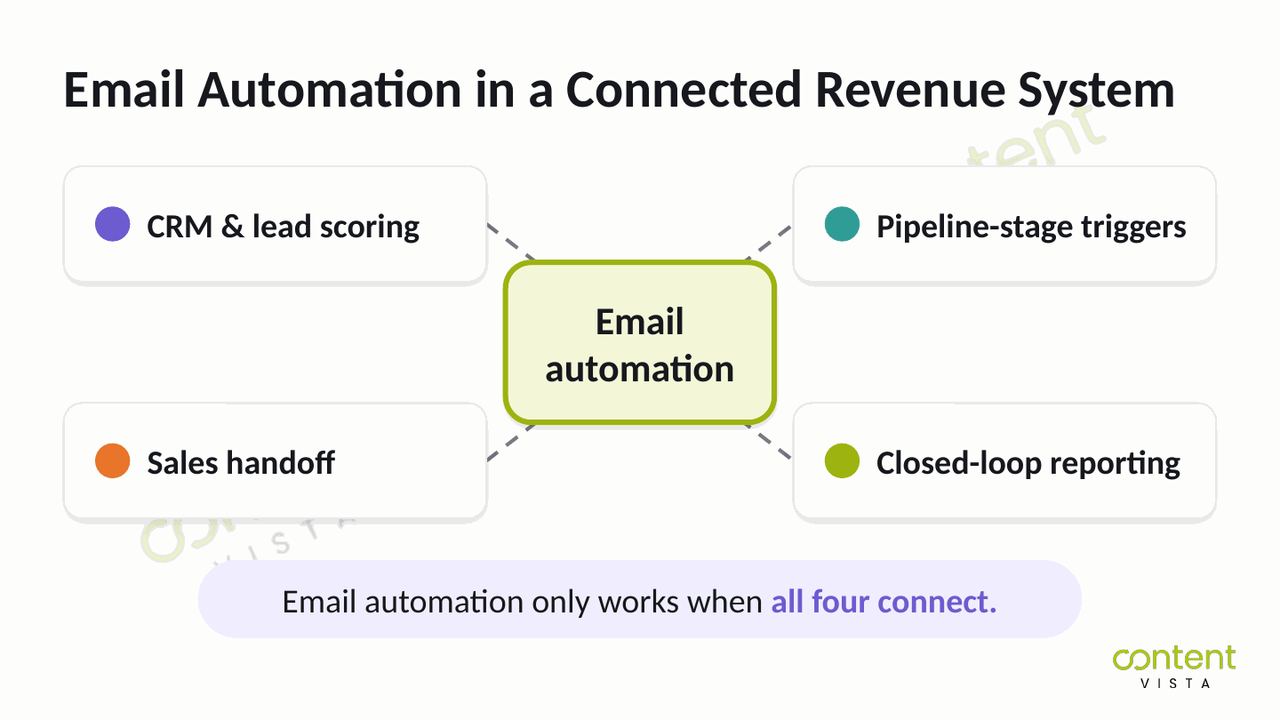
It is one part of a wider connected revenue system: your website, funnel, CRM and reporting working together to turn a visitor into a qualified opportunity.
Building that whole system is a bigger job. This section stays narrower: the four connections that decide whether your email automation produces pipeline or just activity.
One note before you start. If visitors are not converting on your site in the first place, fix website conversion before you tune a single sequence.
CRM and lead scoring: the intelligence that decides what fires
Automation without lead scoring is a timer. It waits for a date or a fixed delay, then sends the next message.
With lead scoring, it responds to evidence.
A prospect may gain points for attending a webinar, visiting a service page, returning to the website or engaging with decision-stage content.
Account fit can add another layer: role, company type, geography, service need or another agreed qualification criterion.
Those signals determine whether the contact stays in nurture, moves to a different workflow or becomes sales-ready.
This is why building a CRM and lead management system must come before adding more sequences.
The CRM supplies the context. The automation executes the response.
Pipeline-stage triggers for a buying committee
A B2B purchase is rarely controlled by one person moving neatly through one sequence.
Forrester’s The State of Business Buying, 2024 found that an average of 13 people are involved in a buying decision, with 89% of purchases spanning two or more departments.
And most of their research happens without you.
A Gartner survey of 632 B2B buyers, published in 2025, found that 61% prefer an overall rep-free buying experience.
The same survey found that 73% actively avoid suppliers who send irrelevant outreach.
So what does that mean?
A single linear drip cannot serve a committee of thirteen people researching largely on their own.
And generic batch-and-blast messages give that committee a reason to tune you out. Different stakeholders need different evidence at different moments.
Lifecycle automation can respond to that complexity.
It can send implementation guidance to an operator, commercial evidence to a financial stakeholder and strategic context to a decision-maker, based on role, behaviour, account activity and pipeline stage.
That is not simply email personalisation. It is account-level orchestration through connected marketing automation and CRM systems.
The sales handoff and speed-to-lead
Automation should not end when someone becomes qualified. That is when the handoff matters most.
Every sales-ready contact needs a defined owner, a routing rule and an immediate notification.
The CRM should record why the person qualified, what they engaged with and what the representative should do next.
This protects speed-to-lead.
It also prevents qualified opportunities from sitting unnoticed between marketing and sales because each team assumed the other was handling them.
A useful handoff is not “new lead assigned.”
It is “high-fit account reached the agreed threshold, based on these actions, and this person owns the next response.”
Closed-loop reporting
The final connection is closed-loop reporting: linking the first meaningful touch to the eventual opportunity and closed deal.
Without it, reporting stops at sends, clicks, form submissions or lead scores. You may know that automation was active, but not whether it influenced the pipeline.
Closed-loop reporting lets you see which workflow created movement, which emails supported progression, where contacts stalled and which automations contributed to qualified opportunities.
It is the foundation for measuring email revenue rather than merely reporting email activity.
Once all four connections are in place, automation stops behaving like an isolated channel.
It becomes part of a connected revenue system.
Not sure where your automation disconnects from your pipeline? The Website Conversion Leak Audit helps you find where qualified opportunities are leaking out, from your forms and CTAs to tracking and follow-up.
Map Every Automation to a Pipeline Stage
List every automation currently running in your system.
Then document four things for each one: the pipeline stage it supports, the trigger that starts it, the person or team that owns the next action and the outcome you measure.
If you cannot complete all four, you have found a leak.
| Automation | Pipeline stage | Trigger | Owner | Measured outcome |
|---|---|---|---|---|
| Welcome sequence | New lead | Form submission | Marketing | Qualification signal captured |
| Nurture track | Engaged, not sales-ready | Content engagement plus lead score threshold | Marketing | Movement to sales-ready |
| Sales handoff alert | Sales-ready | Score threshold crossed | Sales | Speed-to-lead, first response time |
| Re-engagement | Dormant | No activity in a defined window | Marketing | Reactivation or clean removal from list |
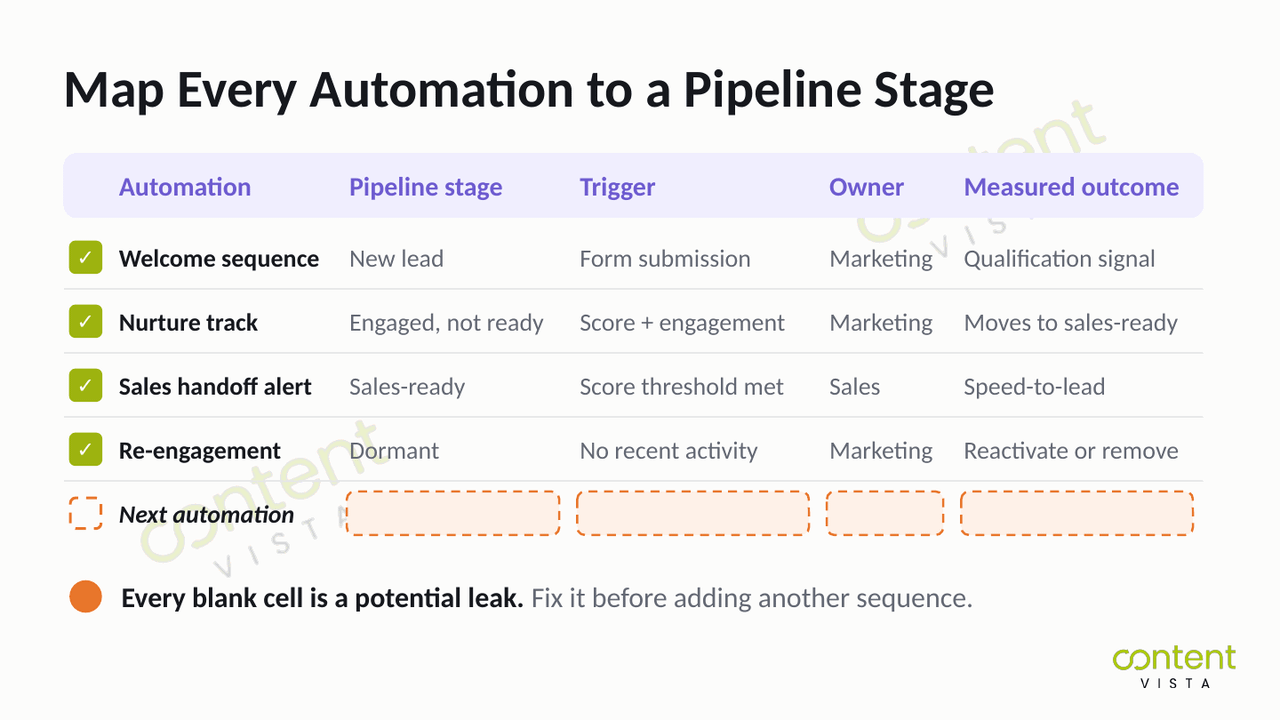
Do not treat blank cells as an administrative issue.
A missing pipeline stage means the automation has no defined commercial role. A missing trigger means it may be firing without a meaningful signal.
A missing owner creates handoff risk. A missing outcome means the workflow can run indefinitely without proving value.
Those blanks are your pipeline leakage.
Fix them before adding another sequence.
Common Mistakes That Kill Email Automation
Set-and-forget automation
The mistake is simple: a workflow is built once, switched on and treated as finished.
But your audience changes. Your offer changes. Your pipeline stages change.
The people who originally designed the sequence may leave, while the automation keeps running on assumptions nobody has reviewed.
Every active workflow needs a regular check for broken links, outdated content, weak triggers, stalled contacts and unclear ownership.
Automation should reduce repetitive work, not remove ongoing judgement.
Batch-and-blast dressed up as automation
A scheduled email is not automatically an intelligent one.
If the same message goes to the same broad list because a date arrived, you are still running batch-and-blast. You are just doing it through an automation platform.
Triggered automation should respond to behaviour, lifecycle stage, account fit or a meaningful change in status.
The question is not, “Did the system send it automatically?”
It is, “Did something relevant happen that justified the send?”
Optimising for opens instead of pipeline
Teams often keep adjusting subject lines while ignoring whether the workflow creates any commercial movement.
Open rates can help identify broad deliverability issues.
But they do not tell you whether a prospect qualified, replied, reached a decision-stage page, entered a sales conversation or contributed to a closed deal.
A workflow can look healthy at the top of the report and still create no qualified opportunities.
Measure the next meaningful action, not the easiest number to display.
Automating the moments that need human judgement
Over-automation usually begins with a reasonable goal: reduce manual work.
Then the system starts handling complex objections, high-value account outreach, post-demo follow-up or stakeholder conversations it does not fully understand.
That is where efficiency turns into distance.
Automation should execute repeatable work. It should not replace judgement in moments where context, empathy, negotiation or account knowledge determines what happens next.
The most mature system is not the one that automates everything.
It is the one that knows where automation should stop.
When NOT to Over-Automate
The right principle is Pilot, not Autopilot.
Automation is an execution layer. It should handle repeatable work under human judgement, not replace judgement altogether.
And here’s the part nobody tells you:
Some of the most commercially important moments in your pipeline are the least suitable for automation.
High-value account outreach should not rely on a generic sequence when the account deserves research and context.
Anything after a demo usually needs a response shaped by what was discussed, who attended and what concerns surfaced.
Complex objections require interpretation, not a pre-written branch.
And if you do not yet understand a stakeholder’s influence, priorities or position in the buying group, automated follow-up can create distance at exactly the wrong time.
That does not mean automation should be limited.
It should run aggressively where the work is repeatable, high-volume and low-judgement.
Think form confirmations, routing alerts, lead-score updates, event reminders, qualification prompts, internal notifications, lifecycle changes, re-engagement checks and routine follow-up where the next step is already clear.
The boundary is context.
Automate work where the system has enough reliable information to make the next action obvious.
Keep a human involved where the right response depends on nuance, trust, negotiation or incomplete information.
So the real question is not, “How much can I automate?”
It is, “Which workflows should be automated, and which should not?”
Not sure where that boundary sits in your own pipeline? The AI Workflow & Pipeline Opportunity Map helps you identify which workflows should run through automation and which still need human judgement.
The strongest automation system is not the one with the fewest manual steps.
It is the one that uses people and automation where each performs best.
What This Looks Like in Practice
The clearest proof of connected automation is not a stronger email metric. It is visible movement through the wider pipeline.
For SalesFed, integrated search, content, webinar funnels and CRM contributed to $400K in qualified pipeline.
The result did not come from email, search, content or webinars working alone.
It came from those parts feeding one another, with CRM providing the connection between engagement and commercial follow-up.
That distinction matters.
A strong channel can create activity. A connected system turns that activity into something the business can track, route and act on.
The same principle appears in a different context with Housewright Handyman.
The work generated 270+ leads at a cost per lead of $15-$25, alongside 450% SEO growth.
The point is not that every business needs the same channel mix.
It is that individual tactics become more valuable when they are tied to a clear conversion path, a defined handoff and a measurable outcome.
Search creates demand. Content builds trust. Email and automation maintain momentum. CRM records what happens next.
When those pieces stay disconnected, each one has to prove itself in isolation.
When they connect, the system can compound.
The Email Automation Metrics That Actually Matter
Since Apple Mail Privacy Protection arrived in 2021, open rate has become more useful as a broad deliverability signal than as proof of engagement.
The numbers make the problem clear.
Email benchmark data compiled by Sopro shows average open rates rising from 18.7% in 2016 to 35.9% in 2024, which Sopro attributes largely to MPP.
Over the same period, click-to-open rates fell from 10.3% to 6.4%.
Opens went up.
Engagement went down.
So stop treating open rate as the headline measure of email automation performance.
The stronger question is whether the workflow created a meaningful action, improved the handoff or influenced the pipeline.
| Metric | Why it matters |
|---|---|
| Click-through rate | A real action, not an image pixel loading. |
| Click-to-open rate | Measures whether the message earned the click. |
| Conversion rate | Ties the send to an intended next step. |
| Revenue per email | Forces each send to justify itself commercially. |
| Pipeline-influenced revenue | The headline number. Connects automation to closed deals. |
| Speed-to-lead | Measures whether the handoff actually works. |
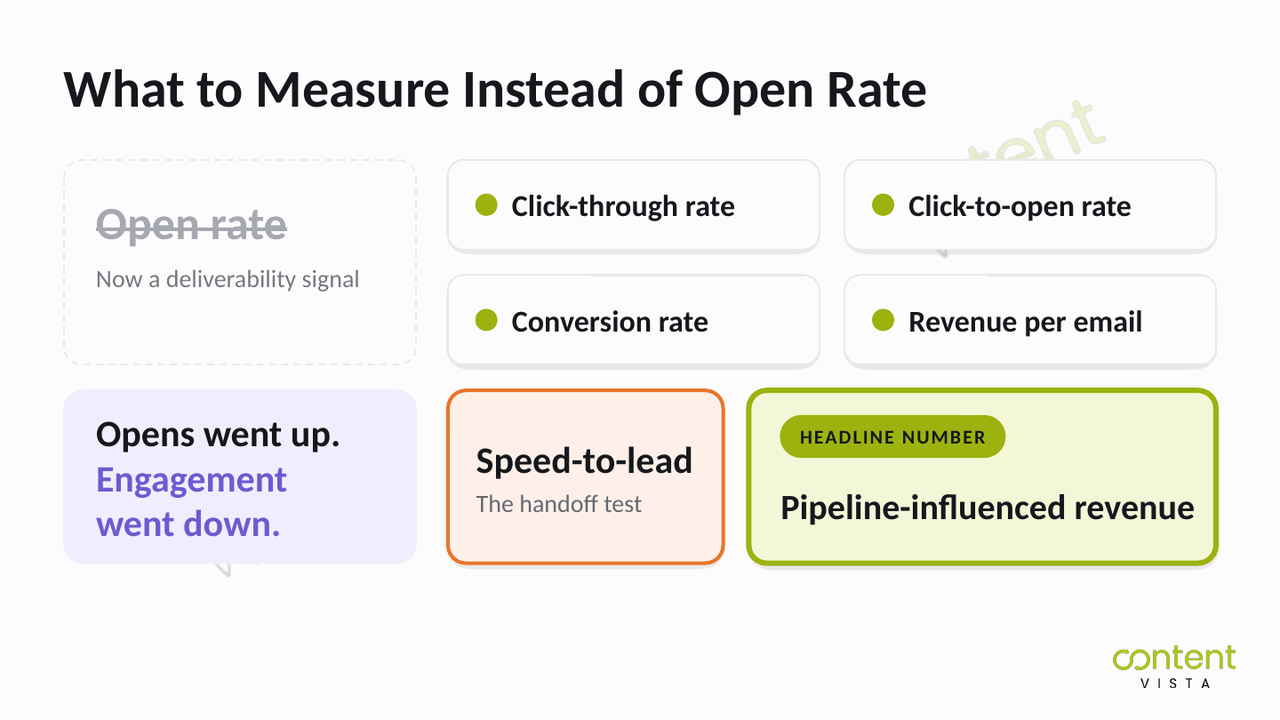
The best metric depends on the workflow’s role.
But every automation should be measured against a commercial next step, not simply whether the message appeared to be opened.
Frequently Asked Questions
What is email marketing automation?
Email marketing automation is software that sends behaviour-triggered messages based on rules, CRM data, pipeline stages and lead activity. In B2B, it should operate as one layer inside a connected revenue system, helping qualify, nurture, route and measure opportunities rather than simply sending scheduled emails.
What's the difference between email automation and a drip campaign?
A drip campaign sends a fixed sequence at predetermined intervals. Email automation is broader and more responsive: it can change messages, timing, ownership and next actions based on behaviour, account fit, lead score or pipeline stage. A drip is one possible workflow inside an automation system.
How is B2B email automation different from ecommerce automation?
B2B email automation supports longer, non-linear buying journeys involving multiple stakeholders. Ecommerce automation often focuses on individual actions such as cart abandonment or post-purchase follow-up. B2B workflows must account for qualification, buying committees, sales handoffs, complex objections and progression toward qualified opportunities.
How do you connect email automation to your CRM and lead scoring?
Connect each workflow to CRM fields, lifecycle stages, behavioural signals and agreed lead-score thresholds. The CRM should decide who enters, when the sequence changes, when sales is notified and who owns the next action. Without that intelligence, automation is only a timer.
What email automation metrics actually matter in B2B?
The most useful metrics are click-through rate, click-to-open rate, conversion rate, revenue per email, pipeline-influenced revenue and speed-to-lead. Open rate can still indicate broad deliverability, but it should not be treated as proof of engagement or commercial impact.
How many automations should you start with?
Start with one high-value automation that has a clear trigger, owner, pipeline stage and measured outcome. Prove that it works before adding more. Launching several workflows at once makes it harder to identify which logic, message, handoff or measurement point is failing.
Can you over-automate email?
Yes. Over-automation happens when workflows replace human judgement in moments that require context, trust or negotiation. High-value account outreach, post-demo follow-up, complex objections and unclear stakeholder dynamics usually need a person. Automation should execute repeatable work, not make nuanced decisions blindly.
How do you measure the revenue from automated emails?
Use closed-loop reporting to connect email activity with CRM opportunities and closed deals. Track which workflow influenced movement, which contacts progressed and what revenue was associated with those opportunities. That requires consistent campaign data, pipeline stages, ownership and attribution. Email-platform reporting alone will not get you there.
Automation Sends. Systems Compound.
Yes, start with one automation.
But before you build it, ask what it connects to.
What behaviour triggers it? Which pipeline stage does it support? Who owns the next action?
What happens when a contact engages? And how will that movement appear in your reporting?
Email automation is one layer inside a connected revenue system.
On its own, it can send faster, follow a schedule and reduce manual effort. That does not automatically make it valuable.
A tool that sends is a cost.
A system that compounds is an asset.
The difference is the systems, conversion and growth infrastructure around it: qualification, routing, CRM logic, ownership, attribution and human judgement at the right moments.
The most expensive gaps are often the ones your email dashboard cannot show you.
A sequence may look active while qualified opportunities stall between the form, the CRM, the handoff and the follow-up.
Find the leaks before they cost you another quarter. Run the Website Conversion Leak Audit to see where your connected revenue system is breaking down. It takes about two minutes.